Blender 5.0 changes the meaning of existing node socket shapes and introduces new ones. The redesign is necessary to further expand what Geometry Nodes is able to do. This post explains the problem we were facing, what the new shapes mean, and how we are going to use them.
The design process was a surprisingly difficult because it involves more impactful trade-offs than one might think. However, solving this is essential for making progress on many important subjects. This topic was discussed at Geometry Nodes workshops in May and October 2024 until we finally reached some consensus.
Problem
To understand the problem, let’s first look back at how socket shapes were used before.
Old Socket Shapes
For the last couple of years, Geometry Nodes used 3 different socket shapes:
- Circle: An input expects a single value or an output produces a single value.
- Diamond: The socket might contain a field.
- Diamond with a dot: An input can be connected to fields, but currently the socket holds a single value.
Additionally, the shapes of sockets changed dynamically as new links were made to reflect the updated knowledge Blender has about the data in sockets.

Limitations
While the old socket shape design worked for the limited kinds of data we had in the past (only single values and fields), it does not work well with newer in-development socket types for lists and volume grids. Additionally, people generally only had a high level understanding of what the socket shapes mean. The meaning of the diamond-with-a-dot shape was especially fuzzy to many.
Generally, how sockets are drawn can communicate many different things. The socket color indicates the base type of the data in it, e.g. whether it is a geometry, float or integer. We do not intend to change these colors. The socket shape indicates the higher level structure of the data, i.e. whether it is a single value, field, list, or volume grid and maybe more in the future. The exact meaning of the shape is more nuanced though. It can indicate any of those or a combination:
- The structure that a node expects or generates.
- The structure that a socket might have based on static analysis of the node group.
- The structure that a socket actually has based on the previous evaluation. This information is also in the tooltip which also got an overhaul recently.
All of this is useful information, but the unfortunate truth is that socket shapes do not have enough visual complexity to communicate all of that. In the past, a combination or the first two approaches was used. However, displaying all the possible combinations requires so many socket shapes that they would stop being useful.
Instead, we have to choose the most essential information to communicate, even if that means losing some information that was visualized before. The tricky part is that people (including myself) have different opinions on what is most essential and those opinions can change quickly when considering different node trees.
Solution
We agreed on the following approach: Socket shapes communicate what data a node expects or generates independent of how it’s used. More specifically, this is the meaning of the new socket shapes:
- Vertical bar: This input expects a single value or this output is always a single value.
- Diamond: This input expects a field or the output is a field.
- Circle: This input allows different kinds of data or this output produces different kinds of data depending on the inputs. This is the most flexible shape.
- Grid/list shape: These features are still in development at the time of writing, but their socket shapes have the same meaning as the diamond for fields.
The diamond-with-a-dot shape is not used anymore.
Examples
Here are a few examples for how existing nodes are affected by this change:
- The Math node has circle sockets (like in shader and compositing nodes) which means that the data structure is dynamic. It can work with single values, fields, lists and more. The type of the output depends on the connected inputs.
- The Triangulate node has a few single value inputs and the selection is evaluated as field.
- The Set Position node expects a single geometry and multiple fields as input. Especially note that all the field inputs have the same shape now because they all expect fields. There is no difference between “expecting a field” and “currently being a field” when it comes to socket shapes anymore. Link drawing still indicates when something might be a field though.
- The cube node only has single value inputs but produces one field output.
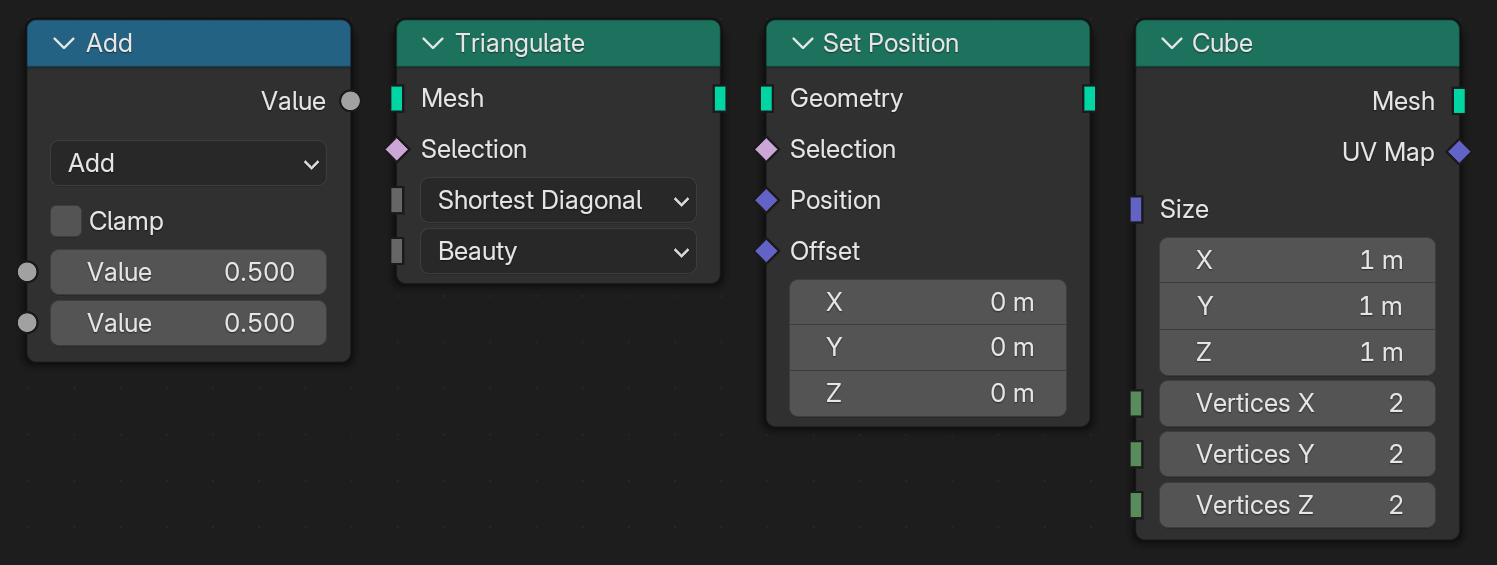
A key aspect and requirement for this to work is that socket shapes never change depending on what they are linked to (with the exception mentioned below). This is quite different from before, where socket shapes were changing all the time depending on the links in the node group.
Node Groups
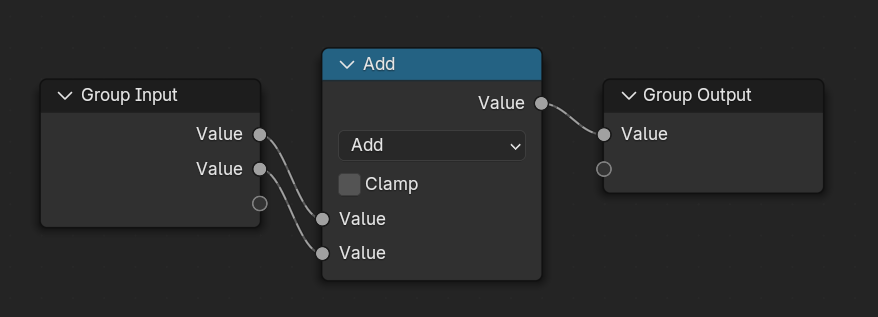
The socket shapes on group input and output nodes are the only ones that may change automatically based on what they are linked to. If possible, Blender will infer the socket shapes for inputs and outputs automatically. However, this can’t work in all cases and in some cases it does not yield the intended result even if it is technically correct. For example, an input may be detected to support fields, but as node group author you really always expect this to be a single value. In such cases, one can override the shape so that it is most useful to its users.

Links
Dashed links still communicate when a field may be passed through it that requires a context to evaluate. Previously, this link drawing was entirely redundant with socket shapes. Now it offers information on top of socket shapes.
New Experimental Shapes
You have already seen the new socket shape for single values: the vertical bar. There are also new shapes for grids and lists. Those are still in development and may still change.
The Sample Grid node has a grid input which is sampled at a position. The position may be a single value, a field, a list or even another grid. Depending on what is passed in, the output value may also be any of those. The situation is similar for the Get List Item node.

Lost Information
We know full well that this new design does not communicate some information that was communicated before:
- Previously, the requirement that a socket has to be a single value was propagated right-to-left. Internally, this propagation still happens, but only to automatically set the shape of group inputs. There are still link warnings when connecting something that’s not a single value to a single value.
- Previously, information about whether a socket might contain a field was propagated left-to-right. This also still happens internally to automatically set shapes of group outputs. Now this information is not available in socket shapes anymore, but it is still available through dashed links.
- Previously, some nodes (e.g. Set Position) had multiple field inputs while only some had a dot in their socket shape. This was useful to see if a socket has a field value by default. Now all inputs have the same shape. The default value of sockets can still be seen by hovering over it, even if the node is not evaluated.
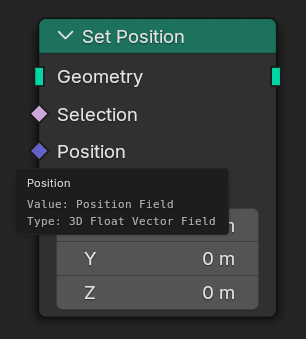
We are also still exploring ways to bring back some information outside of socket shapes like with optional overlays and tooltips. However, we have to be careful not to have such features just for the sake of keeping the old information even if it’s not useful long term for the majority of users.
It seems best to give the new design some time and then decide what information is really missing. It may be some information we had in the past, or something else. For example, we already know that it would be useful to better communicate where fields are evaluated.
Beyond Geometry Nodes
In the past, the non-circle socket shapes were only used by Geometry Nodes, but they can also benefit other node tree types. By using the circle shape for dynamic types, we ensure that most existing sockets in other node tree types stay the same as before.
The first use will be in the compositor to indicate which inputs have to be single values and don’t allow an image to be passed in. The compositor may also get a socket shape for images to differentiate it from the dynamic shape used by e.g. math nodes. There are also talks about supporting fields in the compositor in the future.
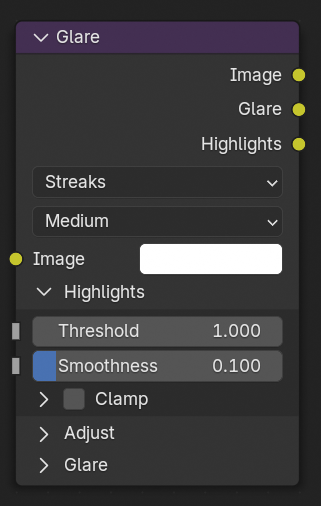
There are no immediate plans to use these socket shapes in shader nodes. However, medium term it would be good to expose some node properties as single value sockets such as the image of the Image Texture node.
Unblocking New Features
As mentioned before, two impactful features were blocked by the socket shape design before: volume grids and lists. This long process made the release of volume grids take way longer than we had initially hoped.
By finally updating the socket shape design, we are a good step closer towards finishing this up and releasing volume grids and starting more serious development on lists.
Conclusion
Changing the meaning of socket shapes affects everyone using Geometry Nodes. It would have been nice to avoid, but that wasn’t possible if we didn’t want to get stuck in the past. While we understand that the lost information is unfortunate, the possibilities we get in return should more than make up for it.
Support Blender
Development requires dedicated design and development resources.
Donate monthly or one-time to help make this happen.


